How to connect Artist 16 3rd (2.5K) to an Android phone or tablet?
Applicable Model:Artist 16 3rd (2.5K)
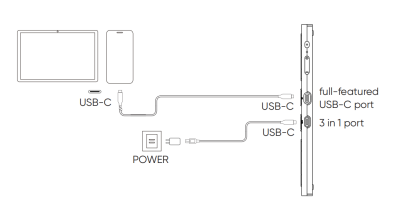
Follow these steps to connect the product to an Android device:
1. Plug one end of the USB-C to USB-C cable into the full-featured USB-C port on Artist 16 3rd (2.5K).
2. Plug the other end into a USB-C port that supports DisplayPort output on your Android device.
3. Use USB-A to USB-C cable to connect the power adapter to the 3-in-1 port on the drawing display.
*A device that supports Desktop Mode is recommended for connection.