How to connect Artist 16 3rd (2.5K) to a computer?
You can choose one of the following two connection methods based on your computer configuration:
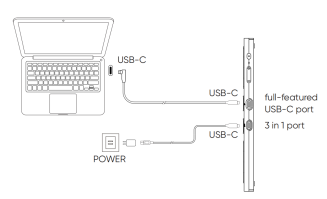
Method 1: Connect to a computer with a USB-C port that supports DisplayPort output
1. Plug one end of the USB-C to USB-C cable into the full-featured USB-C port on Artist 16 3rd (2.5K).
2. Plug the other end into a USB-C port that supports DisplayPort output on your computer.
3. If the screen flickers or does not power on, an additional USB-C to USB-A cable is required to connect the power adapter to the 3-in-1 port on the drawing display to supplement power.
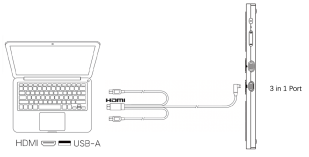
Method 2: Connect to a computer with USB-A and HDMI ports
1. Plug the USB-C cable into the 3-in-1 port on Artist 16 3rd (2.5K).
2. Connect the black USB-A cable and HDMI cable to the corresponding ports on your computer.
3. If the screen flickers or does not power on, connect the red USB-A plug additionally to supplement power.