How to connect Artist Pro 24 Gen 2 to my computer?
Applicable Model:Artist Pro 24 (Gen 2) 4K,Artist Pro 24 (Gen 2) 165Hz
How to connect Artist Pro 24 Gen 2 to my computer?
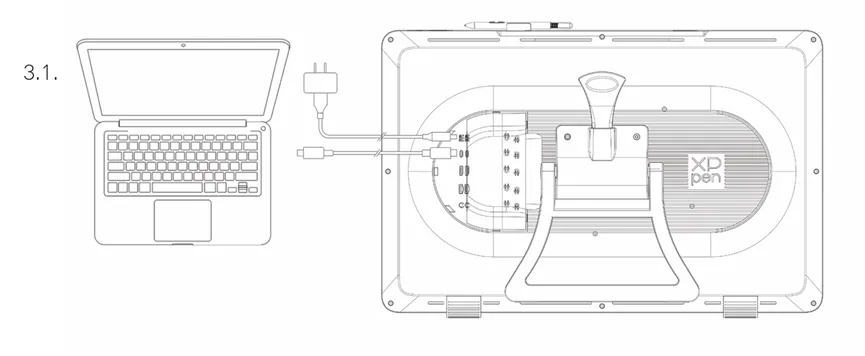
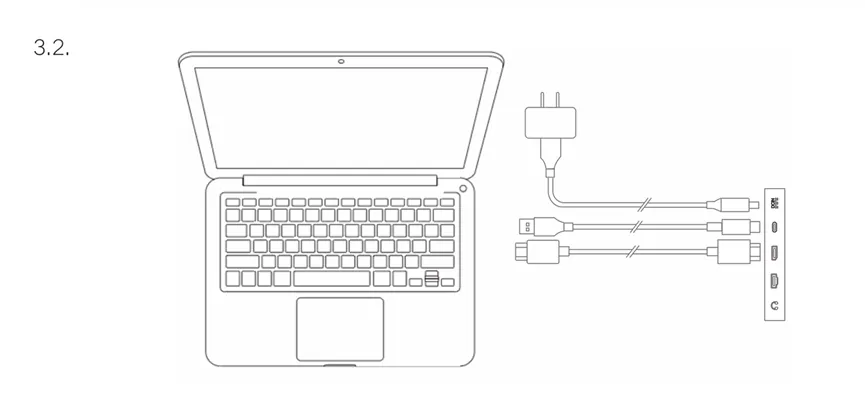
The cables included in the standard package are: 1 x Power adapter and power cord, 1 x DisplayPort cable, 1 x HDMI cable, 1 x USB-C to USB-C cable, and 1 x USB-C to USB-A cable
There are 3 ways to connect the Artist Pro 24 Gen 2 4K and 165Hz tablets to a laptop, desktop pc, or a mini pc. Please select the proper way that suits your computer.
- USB-C to USB-C cable + power cable: USB-C to USB-C cable must be connected to a full-featured USB C port on your computer.
- DisplayPort cable + USB-C to USB-A cable + power cable: USB A end goes to the computer and USB C end goes to the tablet.
- HDMI cable + USB-C to USB-A cable + power cable: USB A end goes to the computer and USB C end goes to the tablet.
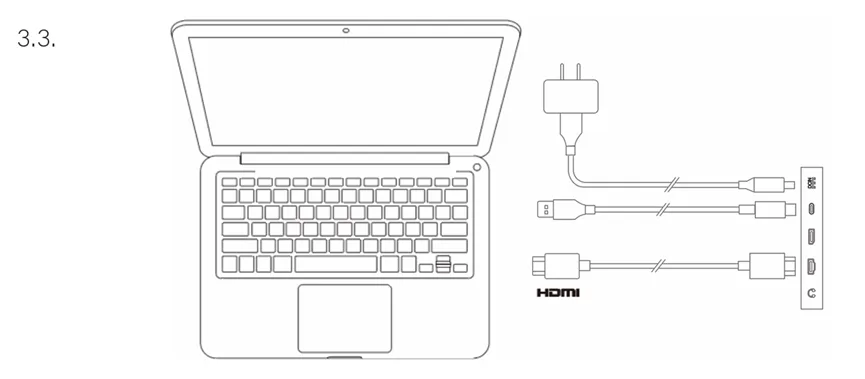
If you are using a desktop pc, please connect the Displayport cable or HDMI cable to the graphics card.
For further questions, please email our tech support service: service@xp-pen.com