Shortcut keys work on other software, but not specific software
Applicable Model:Artist 13.3,Artist 15.6,Artist 16 Pro,Artist 22 Pro,Artist 22E Pro,Artist 12,Artist 15.6 Pro,Deco 01,Deco 03,Deco 02,Deco Pro S/M,Artist 13.3 Pro,Deco 01 V2,Artist 12 Pro,Artist 22R Pro,Artist 24 Pro,Innovator 16,Deco mini7,Deco mini4,Deco S,Deco mini7W,Artist 13.3 Pro Holiday Edition,Artist 22 (2nd Generation),Deco Fun,Deco Pro SW/MW,Artist Pro 16TP,Artist 24,Artist Pro 16, Artist 12 (2nd Generation),Deco LW,Deco L,Artist 13 (2nd Generation),Artist 16 (2nd Generation),Deco M,Deco MW,Artist 10 (2nd Generation),Artist 24 (FHD),Artist Pro 14 (Gen 2),Deco Pro (Gen 2) Series,Artist Pro 16 (Gen 2),Artist 13.3 V2,Artist 22 Plus,Artist 12 Pen Display (2nd Gen) Le Petit Prince Edition,Artist 16 Pen Display (2nd Gen) Le Petit Prince Edition,Deco 640,Deco 01 V3,Deco mini7 V2,Artist Pro 24 (Gen 2) 4K,Artist Pro 19 (Gen 2),Artist Pro 24 (Gen 2) 165Hz,Artist 13.3 Pro V2,Artist 15.6 Pro V2,Artist Pro 22 (Gen 2),Artist Ultra 16,Artist 12 3rd,Deco mini7W V2,Artist Pro 27 (Gen 2),Artist 16 3rd
Shortcut keys work on other software, but not specific software
When pressing the shortcut key for your graphics tablet or drawing tablet in the Windows system, the function displays a prompt on the screen, but they don’t work on the drawing software. Please follow the steps below:
- Check if your computer's input method is set to English.
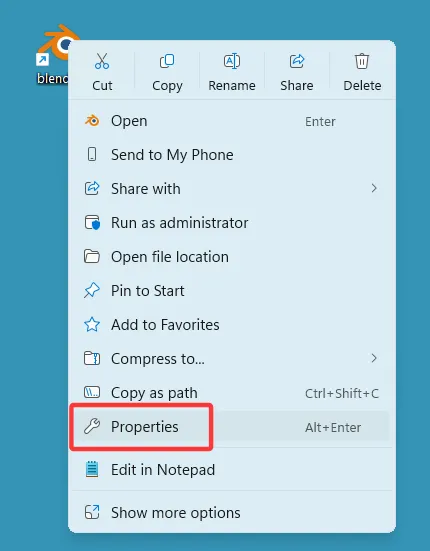
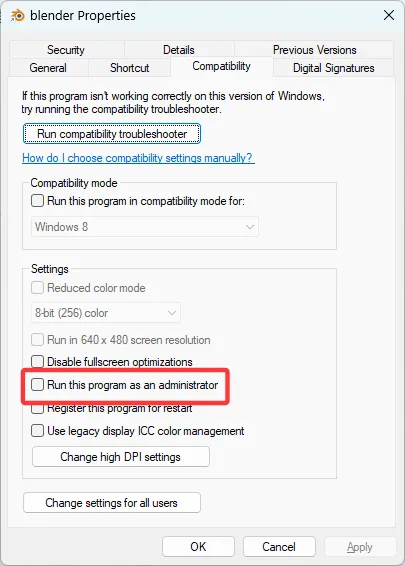
- Right-click the drawing software icon on your desktop, go to "Properties" > "Compatibility", uncheck the box next to "Run this program as an administrator," then click Apply and OK.