How to switch from Pen Display to Tablet mode?
Applicable Model:Artist 22 Pro,Artist Pro 16TP, Artist 12 (2nd Generation),Artist 13 (2nd Generation),Artist 16 (2nd Generation),Artist 10 (2nd Generation),Artist Pro 14 (Gen 2),Artist Pro 16 (Gen 2),Artist 13.3 V2,Artist 12 Pen Display (2nd Gen) Le Petit Prince Edition,Artist 16 Pen Display (2nd Gen) Le Petit Prince Edition,Artist Pro 24 (Gen 2) 4K,Artist Pro 19 (Gen 2),Artist Pro 24 (Gen 2) 165Hz,Artist 13.3 Pro V2,Artist 15.6 Pro V2,Artist Pro 22 (Gen 2),Artist Ultra 16,Artist 12 3rd,Artist Pro 27 (Gen 2),Artist 16 3rd,Artist Ultra 14
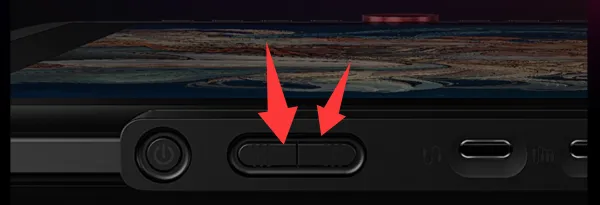
1. Press and hold the power button on the tablet for more than three seconds. When the blue and orange indicator lights flash alternately, it is in the tablet mode.
In the tablet mode, press the power button again to return to the display mode.