Troubleshooting for pen not working issue on Windows OS
Troubleshooting for pen not working issue on Windows OS
Please use a USB cord to connect the tablet to the Windows computer.
Go to “Device Manager” to check all USB Composite Devices there by following the steps below.
Device Manager >> Universal Serial Bus >> USB Composite Device >> (right click)Properties >> Details >> Hardware ids>> to check whether there is a device VID 28BD
The picture below is for reference.
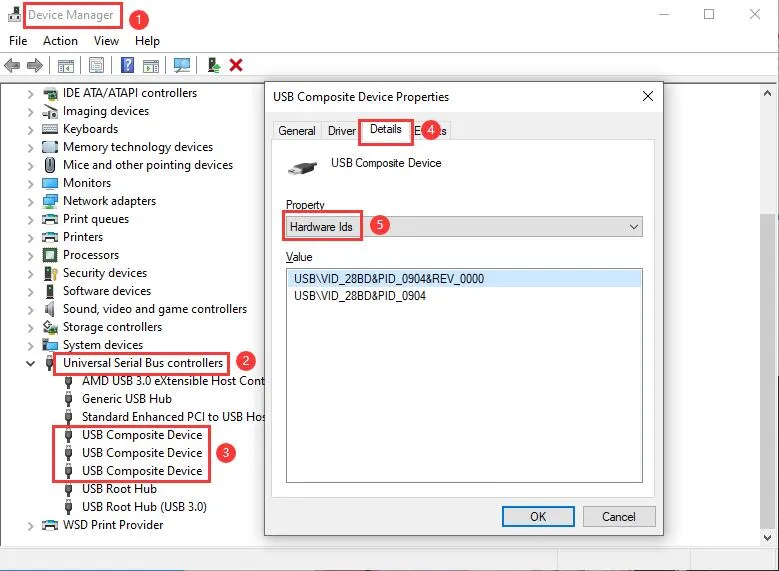
3. If no “VID 28BD” was found, please use another working USB cord(not the original USB cord) to connect the tablet and check the USB Composite Devices again. Also test if the pen & driver will work with another working USB cord.
4. If “VID28BD” was found and all the buttons on the tablet work when using another working USB cord for the connection, then the issue could be with the pen.
5. If “VID28BD 1227/ FFF1/FFF2/FFF3” was found in the Device Manager, please screenshot it and email us at service@xp-pen.com to tell us the tablet model ane issue so that we can further help.