
Best 11-Inch Tablets for Productivity and Note-Taking
ROUNDUPSIn today’s fast-paced digital world, tablets have become essential tools for students, professionals, and creatives. Among the many form factors available, the 11-inch size offers a particularly appealing balance between portability and usable workspace. It provides enough screen real estate for comfortable note-taking, reading, multitasking, and light creative work—while still being compact enough to carry effortlessly in a backpack or handbag.
This guide highlights the best 11-inch Android tablets for handwriting, note-taking, and productivity. Each device was evaluated based on display quality, stylus performance, system responsiveness, software ecosystem, and battery life. Whether you're a student recording lectures, a professional organizing tasks, or a writer crafting ideas, these tablets deliver reliable performance to support your workflow.
Evaluation Criteria
To ensure a fair and comprehensive comparison, each 11-inch tablet was evaluated across the following key factors:
Display and Visual Experience
We assessed screen resolution, brightness, refresh rate, color accuracy, and whether the display offers a paper-like texture ideal for writing. A sharp, comfortable display enhances both productivity and long sessions of reading or annotating.
Stylus Experience
A good writing tablet requires a responsive stylus. We examined pressure sensitivity, latency, pen comfort, tilt support, shortcut buttons, and overall handwriting feel. Smooth, natural pen input is a must for effective note-taking.
Operating System and Software Ecosystem
The OS determines which apps and features are available. We considered Android version, availability of Google Play apps, and pre-installed tools for productivity or creativity. App compatibility directly impacts how the tablet fits different workflows.
Performance and Storage
Processor, RAM, and storage capacity affect multitasking and long-term usability. We focused on tablets capable of handling note-taking apps, cloud sync, video calls, and light creative tools without lag.
Portability and Battery Life
Weight, thickness, battery size, and charging speed play an important role for students and professionals on the go. The best note-taking tablets should last through a full day of classes or meetings.
Extra Features
We also considered secondary features that enhance productivity, such as:
Cloud sync support
Audio/video conferencing quality
Compatibility with keyboard accessories
Multi-window and split-screen multitasking
These factors greatly influence how efficiently users can work on an 11-inch tablet.
Top 4 11-Inch Tablets for Note-Taking and Productivity
Top1. XPPen Magic Note Pad — The Paper-Like Note-Taking Specialist
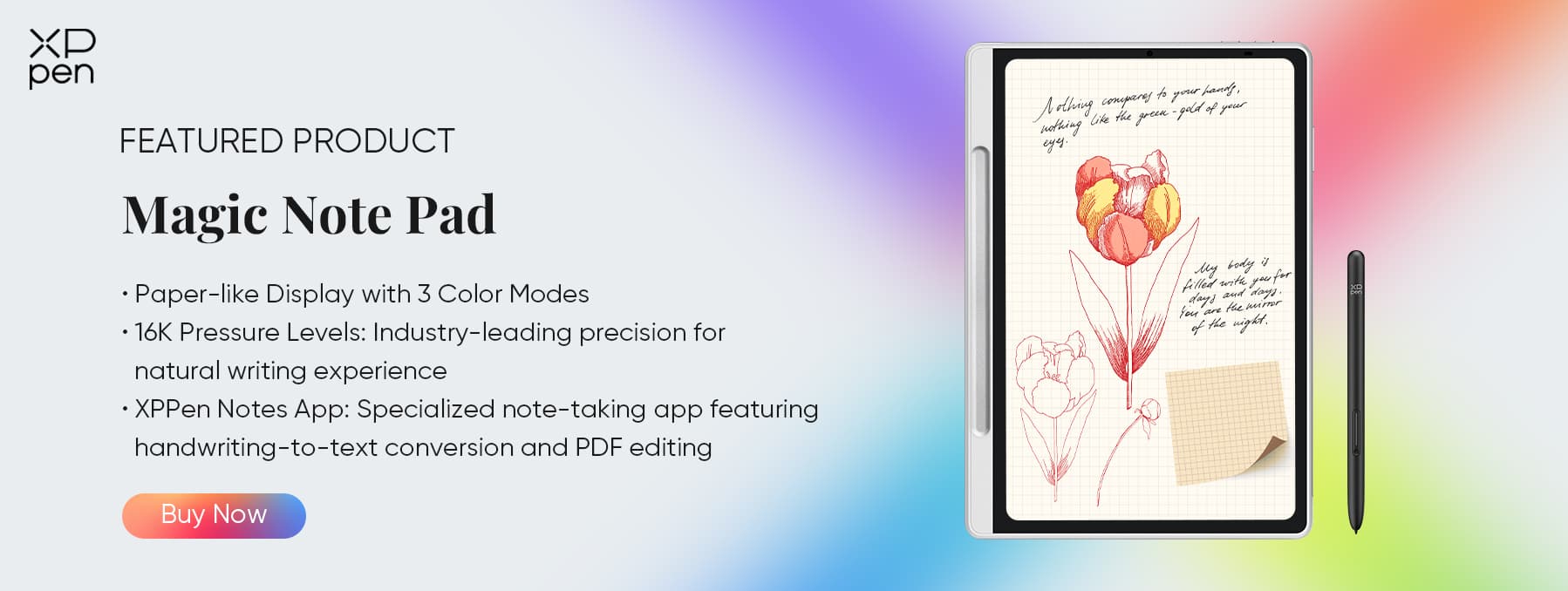
Why It Stands Out:The XPPen Magic Note Pad blends the tactile comfort of paper with the flexibility of Android apps. Its X-Paper display simulates the friction of real notebooks, making it ideal for journaling, note-taking, and sketching. Paired with a highly responsive 16K-pressure pen, it provides one of the most natural and satisfying handwriting experiences available on an 11-inch device.
Key Features:
X-Paper Display with Three Texture Modes – Simulates real paper for a natural writing and sketching feel, reducing fatigue during long sessions.
16K-Level Pressure Sensitivity with X3 Pro Pencil 2 – Captures subtle stroke variations for precise handwriting and detailed sketches.
Android 14 Operating System – The latest Android OS provides a smooth, intuitive interface and access to a wide range of apps from the Google Play Store. This allows you to customize your workflow with productivity, note-taking, and creative applications, making the tablet versatile beyond just handwriting.
XPPen Notes App – This pre-installed app is optimized for the Magic Note Pad, offering features like digital notebooks, annotation, layering, and cloud sync. It ensures that your notes, sketches, and annotations are organized, easily searchable, and shareable, improving efficiency for students, professionals, or creatives.
128GB Internal Storage – Ample onboard memory lets you store thousands of notes, sketches, PDFs, and reference materials without worrying about running out of space. Combined with cloud backup support, it enables seamless access to your content anywhere, making the tablet a reliable tool for long-term, heavy use.
8000mAh Battery – Long-lasting power for extended work, study, or creative sessions without frequent charging.
Ideal For: Writers, students, and professionals who want a realistic handwriting feel with the convenience of digital tools.
Top2. Samsung Galaxy Tab S9 (11-inch) — The Premium All-Rounder
Why It Stands Out:The Galaxy Tab S9 is one of the most versatile 11-inch tablets on the market. Samsung’s S Pen offers exceptionally smooth handwriting, while DeX Mode turns the tablet into a laptop-like productivity machine—perfect for multitasking, document editing, and presentations. It excels in nearly every category.
Key Features:
Dynamic AMOLED 2X display with vivid colors and deep contrast
S Pen with ultra-low latency for fluid writing and drawing
Snapdragon 8 Gen 2 chip for powerful performance
Premium build, IP68 water and dust resistance
Ideal For: Professionals, students, and artists who value a combination of high performance, stunning visuals, and reliable software support.
Top3. Lenovo Tab P12 Pro (11-inch) — Balanced Power and Creativity
Why It Stands Out:The Lenovo Tab ****P12 Pro strikes a compelling balance between performance, display quality, and value. Its high-refresh-rate AMOLED screen makes writing, sketching, and reading especially enjoyable. Combined with a capable stylus and solid battery life, it’s a strong choice for both productivity and creativity.
Key Features:
AMOLED 2.5K display with vibrant colors and deep blacks
Supports Lenovo Precision Pen 3
120Hz refresh rate for ultra-smooth pen and touch interactions
Good performance for multitasking and media
Ideal For: Creatives and multi-taskers who want a premium display and stylus experience without the ultra-premium price tag.
Top4. Apple iPad Pro (11-inch) — The Creative Powerhouse
Why It Stands Out:The iPad Pro 11″ remains unmatched for creative work. Apple Pencil tracking is incredibly precise, and the tablet’s powerful hardware handles graphics apps effortlessly. For users who need a device for both serious note-taking and professional-level production, the iPad Pro delivers exceptional results.
Key Features:
11″ Liquid Retina display with ProMotion 120Hz
Apple Pencil (2nd gen) with industry-leading accuracy
iPadOS offers a vast library of professional creative apps
Ideal for Procreate, Photoshop, LumaFusion, and more
Ideal For: Designers, artists, and professionals seeking top-tier performance and the most advanced stylus experience available in an 11-inch form factor.
Comparison of the Best 11-Inch Tablets
| Tablet | Display | Stylus / Pen | OS / Software | Key Strengths | Ideal For |
|---|---|---|---|---|---|
| XPPen Magic Note Pad | X-Paper display, 3 color modes | X3 Pro Pencil 2, 16K pressure | Android 14, XPPen Notes app | Paper-like handwriting feel, large battery, 128 GB storage | Writers, students, note-takers |
| Samsung Galaxy Tab S9 (11") | Dynamic AMOLED 2X | S Pen, ultra-low latency | Android 14, Samsung DeX | High display quality, professional performance, multi-tasking | Professionals, artists, productivity users |
| Lenovo Tab P12 Pro (11") | AMOLED 2.5K, 120 Hz | Lenovo Precision Pen 3 | Android 12/13 | Smooth stylus response, vivid color, competitive price | Creatives, multitaskers, casual artists |
| Apple iPad Pro (11") | Liquid Retina, ProMotion 120Hz | Apple Pencil (2nd gen), tilt & pressure | iPadOS, Procreate/Photoshop/LumaFusion | Industry-leading stylus, responsive display, wide creative app ecosystem | Artists, designers, professionals needing precision and portability |
FAQ about 11-Inch Tablets
Q1: Why choose an 11-inch tablet for note-taking and productivity?
An 11-inch tablet offers the ideal balance between portability and workspace. It’s large enough for comfortable writing, drawing, and multitasking but still light enough to carry around. Many models also support high-resolution displays and stylus input for professional note-taking or digital art.
Q2: What makes the XPPen Magic Note Pad unique compared to other tablets?
The XPPen Magic Note Pad features a 3-in-1 X-Paper Display that mimics real paper texture, combined with the X3 Pro Pencil 2 offering 16K pressure levels—far higher than most competitors. It’s designed specifically for handwriting, PDF annotation, and creative sketching, providing a tactile, low-glare writing experience unlike typical glossy screens.
Q3: How important is stylus pressure sensitivity for note-taking?
Pressure sensitivity determines how accurately your handwriting or strokes are captured. Higher levels (e.g., 16,384 on XPPen vs. 4,096 on many others) allow for smoother, more natural lines, particularly for artistic sketching or nuanced handwriting.
Conclusion
Choosing the right 11-inch tablet ultimately depends on your workflow and priorities.
If you want a realistic, paper-like handwriting experience and dedicated note-taking functionality, the XPPen Magic Note Pad is your best choice.
If you need professional-grade multitasking and creative performance, the Samsung Galaxy Tab S9 is your best choice.
If you’re looking for a well-rounded option that balances stylus responsiveness with vibrant visuals for both artistic and office tasks, the Lenovo Tab P12 Pro is your best choice.
If you’re a creative professional who requires industry-leading stylus accuracy, a highly responsive display, and access to a robust ecosystem of apps, the Apple iPad Pro (11") is your best choice. By considering each tablet’s strengths, you can make an informed decision that perfectly fits your creative, educational, or professional needs.
About Us
Founded in 2005, XPPen is a leading global brand in digital art innovation under Hanvon UGEE. XPPen focuses on the needs of consumers by integrating digital art products, content, and services, specifically targeting Gen-Z digital artists. XPPen currently operates in 163 countries and regions worldwide, boasting a fan base of over 1.5 million and serving more than ten million digital art creators.
Learn more






Ready to invest in the right tools?
Get expert buying advice, unbiased reviews, and exclusive deals on drawing tablets, and accessories.
