The Best 27-Inch Monitors For Pro Artists in 2026
ROUNDUPSChoosing the right display for professional creative work is one of the most important decisions a digital artist can make. A monitor with poor color accuracy doesn't give you any warning signs. It just quietly works against everything you produce, and you might not realize it until the damage is already done. We'll walk through what actually matters, then break down the five best 27-inch monitors for artists in 2026.
What Makes a Great 27-Inch Monitor for Artists?
Size
Twenty-seven inches is the sweet spot for creative work. Big enough to see fine details without constantly zooming in, small enough to fit on most studio desks, and the right size for 4K to actually make a noticeable difference in pixel density.
Resolution
On resolution, 4K at 3840x2160 is the minimum for serious work at this size. Drop below that and fine lines start losing their crispness in ways that matter.
Color Accuracy
Color accuracy is where things get critical. For professional work, Delta E needs to be below 2, with below 1 being effectively imperceptible. Full Adobe RGB and Display P3 coverage is also non-negotiable, especially for print designers. Surprises when work leaves the screen are not acceptable.
Refresh Rate
Refresh rate is worth paying attention to if you're doing any pen work. 60Hz will technically do the job, but the lag is noticeable. 120Hz makes pen input feel genuinely connected in a way that's hard to go back from once you've experienced it.
27-Inch Monitors for Pro Artists Quick Comparison Table
| Artist Pro 27 (Gen 2) | Kamvas Pro 27 | Cintiq Pro 27 | BenQ PD2705U | Dell U2723QX | |
|---|---|---|---|---|---|
| Type | Pen Display | Pen Display | Pen Display | Monitor | Monitor |
| Resolution | 4K | 4K | 4K | 4K | 4K |
| Refresh Rate | 120Hz | 144Hz | 120Hz | 60Hz | 60Hz |
| Color Gamut | 99% Adobe RGB | 98% Adobe RGB | 99% Adobe RGB | 99% sRGB | 95% sRGB |
| Color Certification | Calman Verified | Self-reported | Pantone Validated | Factory calibrated | None |
| Pen Pressure | 16,384 | 16,384 | 8,192 | N/A | N/A |
| Multi-Touch | Win / macOS / Linux | Yes (10-point) | Yes (10-point) | No | No |
| Stand Included | Yes | No (VESA, sold separately) | No (+~$470) | Yes | Yes |
| Remote Included | Yes (ACK05) | Yes (Keydial K40) | No (sold separately) | No | No |
Our Best Picks For 27-Inch Monitors for Pro Artists
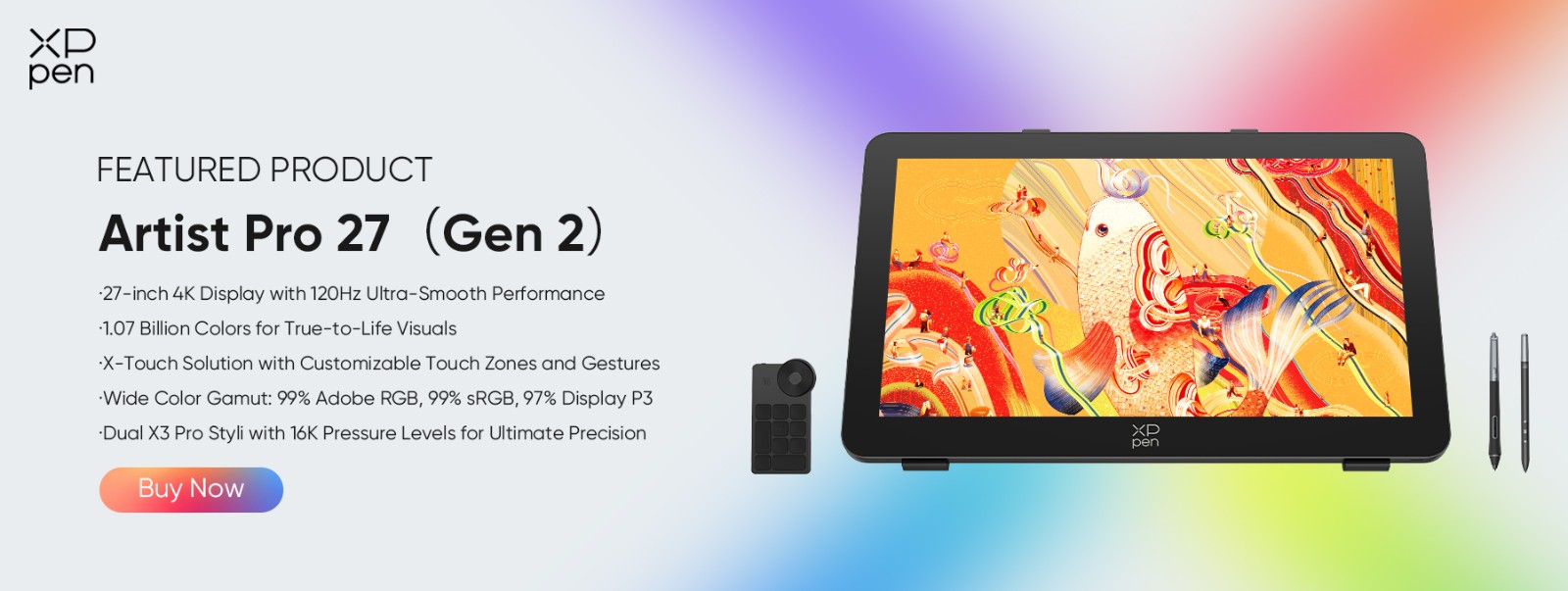
1. XPPen Artist Pro 27 (Gen 2)
If your day is built around drawing, painting, or any kind of detailed visual work, The XPPen Artist Pro 27 (Gen 2) is the display that gets out of your way and lets you focus on what you're actually doing.
The 120Hz refresh rate isn't just a gaming spec here. For illustration work, it's genuinely important. Paired with 4K resolution on a 26.9-inch surface, you get a canvas large enough to work through complex compositions at near-actual size without constantly zooming in and out.
Color accuracy is what actually sets this apart from the competition. A lot of displays claim a ΔE below 1, but XPPen has had theirs verified through Calman rather than just putting the number on the box. Right now, no other 27-inch pen display on the market combines 120Hz, a verified ΔE below 1, and third-party color certification at the same time. XPPen devices also come with free color calibration software.
Two styluses are included, the X3 Pro Smart Chip and the X3 Pro Slim. Both respond to pressure from as light as 3g through 16,384 levels of sensitivity. Ten-point multi-touch is supported across Windows, Mac, and Linux, and the adjustable stand comes included in the box.
Pros:
-
Independently verified color accuracy
-
120Hz refresh
-
Both styli included
-
Stand included
-
Cross-platform multi-touch
Cons:
-
Requires a computer connection
-
sits at a premium price point
2. Huion Kamvas Pro 27 (144Hz)
For fast-working artists like animators, gestural illustrators, and storyboard artists who need to move through scenes, pages, and compositions quickly, the Kamvas Pro 27 offers the highest refresh rate of any 27-inch pen display currently available at 144Hz.
The specs across the board are strong. 4K UHD, 98% Adobe RGB, 16,384 levels of pressure sensitivity, and the Keydial Mini shortcut remote is included in the box.
The one thing worth noting is that unlike XPPen, Huion's claim of ΔE below 1 color accuracy hasn't been verified by a third party. For animation and illustration work that stays on screen, that's not really a concern. For print work where color precision has real consequences, it's something to factor into your decision.
Pros:
-
Highest refresh rate in the category
-
16,384 pressure levels
-
Keydial Mini included
-
Strong color gamut coverage
Cons:
-
Multi-touch on Windows only
-
Color accuracy is self-reported rather than independently certified
3. Wacom Cintiq Pro 27
The display itself is excellent. 4K at 120Hz, 99% Adobe RGB, Pantone Validated, and SkinTone Validated. But the display isn't really the story here. The real innovation is the new Pro Pen 3, which lets you adjust the weight, grip thickness, and balance point of the stylus to suit your hand specifically. No competing device offers that level of physical customization, and for artists who spend hours a day with a pen in their hand, it's a meaningful difference.
There are trade-offs worth knowing about. Pressure sensitivity tops out at 8,192 levels rather than the 16,384 that Huion and XPPen offer, though in practice the difference at this level is not significant. The active fan cooling system is also noisy, which is worth factoring in if you work in a quiet studio environment.
Then there's the price. At $3,499 base with the stand running an additional $470, it's significantly more expensive than the alternatives. You're paying for the Wacom ecosystem and the Pro Pen 3's customization, and whether that's worth it depends entirely on what your work demands.
Pros:
-
Pantone Validated
-
Highly customizable Pro Pen 3
-
Unmatched driver ecosystem
-
HDR support
Cons:
-
Most expensive option by a significant margin
-
Stand sold separately
-
8,192 pressure levels
-
Audible fan
4. BenQ PD2705U
Not every artist needs to draw directly on their screen. If you're already comfortable working on a screenless tablet and just need a large, color-accurate, high-resolution display to pair it with, the BenQ PD2705U is a compelling option at a fraction of what a pen display costs.
It's a 27-inch 4K IPS panel, factory calibrated to 99% sRGB with solid Display P3 coverage, and Thunderbolt 4 connectivity means it can handle video, data, and power to your laptop through a single cable. For artists who don't need a pen surface, it's a hard value proposition to argue with.
What you lose is obvious. If you want to draw on this screen, you can't. It is simply a monitor, and only really makes sense if you already have a tablet you are happy with.
Pros:
-
Factory-calibrated color
-
Thunderbolt 4 single-cable setup
-
Lower price than pen displays
Cons:
-
No pen input
-
No touch
-
Requires a separate tablet for any drawing workflow
5. Dell UltraSharp U2723QX
The Dell UltraSharp U2723QX is a pragmatist's monitor. A 27-inch 4K display with an IPS Black panel that does everything well without particularly excelling at any one thing.
The IPS Black panel delivers higher contrast ratios than a standard IPS panel, USB-C connectivity keeps cable management clean, and the build is solid enough to handle constant daily use without complaint. There's no calibration report included, and color accuracy, while good, doesn't reach the levels of the displays higher up on this list.
But that's not really who this monitor is for. If you're a designer who also takes video calls, edits documents, and presents to clients from the same screen, this is the display that handles all of it without forcing you to compromise on any one task. For that specific kind of workflow, it makes a lot of sense.
Pros:
-
IPS Black contrast
-
USB-C
-
Solid build quality
-
Versatile connectivity
Cons:
-
Not a pen display
-
Color accuracy below the dedicated creative monitors
-
No factory calibration report
Key Features to Consider When Choosing
Connectivity
One practical thing worth knowing before you buy is that not all cables deliver full refresh rates. If you want 4K at 120Hz, you need DisplayPort or USB-C with DisplayPort Alt Mode. HDMI 2.0 maxes out at 4K 60Hz, so if your GPU only has HDMI ports, you lose the 120Hz advantage entirely. It's the kind of detail that catches people off guard after the fact. The industry is moving toward USB-C for good reason since it carries video, data, and power through a single cable, and that's worth factoring in when you're looking at connectivity options.
Ergonomics and Desk Space
A 27-inch pen display takes up real desk space, so tilt range matters more than most people expect. Look for at least 16° to 72° of adjustment to find a comfortable drawing angle. If you're planning to use a monitor arm, confirm the display is VESA 100x100mm compatible. And if you're looking at Wacom, keep in mind that the stand is sold separately and isn't cheap.
Pen Input vs. a Separate Tablet
This comes down to workflow more than anything else, for example drawing with a graphic tablet is different compared to a drawing tablet. Drawing directly on the screen feels more intuitive for a lot of artists, but it comes with a significant price premium over pairing a high-quality monitor with a screenless tablet. If you're already comfortable with a tablet setup that works for you, something like the BenQ PD2705U may simply give you more value per dollar on color accuracy than stepping up to a pen display would.
FAQs
What's better for artists: 27-inch or dual 24-inch monitors?
A single 27-inch 4K screen is generally the better choice for drawing and painting. Maintaining color consistency across two monitors is difficult, and a bezel cutting through your canvas is a real problem for detailed work. Dual monitors make more sense as a reference screen paired with an active canvas setup.
Do I need a pen display or can I use a separate tablet?
You don't need one. Many artists work with a screenless tablet and a high-accuracy monitor and produce great work. Pen displays offer a more direct feel that a lot of artists prefer, but the price jump is significant. Start with a mid-range tablet and a good monitor before committing to a pen display.
Is 4K necessary for a 27-inch monitor?
For professional creative work at this size, yes. The pixel density difference between 4K and 1440p is noticeable in fine linework, text, and detailed textures, and it matters most for high-resolution print work.
How important is 120Hz for digital painting?
More than most people expect. The difference shows up in stroke fluidity, especially for quick gestural drawing and animation preview. Less critical for static photo editing, but for drawing and animation it's a meaningful upgrade.
Should I get a monitor with built-in calibration?
Third-party verification like Calman Certified is worth more than a factory calibration claim. What matters is independent confirmation of the accuracy, not just the manufacturer's promise.
What's the best 27-inch monitor for Photoshop and Illustrator?
For drawing directly on screen, the XPPen Artist Pro 27 (Gen 2). For photo and vector work with a separate input device, the BenQ PD2705U offers excellent color accuracy at a significantly lower price point, with Adobe RGB coverage that makes it a solid choice for print work.
Conclusion
If you draw directly on screen and need independently verified color accuracy, the XPPen Artist Pro 27 (Gen 2) is currently the best in class. If maximum refresh rate is the priority and you're on Windows, the Huion Kamvas Pro 27 at 144Hz is worth considering, though its accuracy figures are self-reported. For studios already in the Wacom ecosystem, the Cintiq Pro 27 remains the gold standard despite the premium price. Whichever you choose, the right display is the one that disappears into your workflow and lets the work take over.
About Us
Founded in 2005, XPPen is a leading global brand in digital art innovation under Hanvon UGEE. XPPen focuses on the needs of consumers by integrating digital art products, content, and services, specifically targeting Gen-Z digital artists. XPPen currently operates in 163 countries and regions worldwide, boasting a fan base of over 1.5 million and serving more than ten million digital art creators.
Learn moreRecommended Articles
ROUNDUPS Top 6 High PPI Monitors in 2026 for Designers & Gamers ROUNDUPS 22 Inch Monitor Buying Guide: Finding Your Perfect Display






Ready to invest in the right tools?
Get expert buying advice, unbiased reviews, and exclusive deals on drawing tablets, and accessories.
