5 Best iPads for College: Top Picks for Every Student
FOCUSEDThe best iPad for college depends on how you study, take notes, create projects, and move around campus. Some students mainly need handwritten notes, PDF reading, and online classes. Others need a tablet for drawing, graphic design, animation, or video editing. Some students want an affordable second device, while others need a tablet that works alongside their laptop.
This guide compares 4 iPad models, as well as XPPen Magic Pro 13 Standalone Drawing Pad - the iPad alternative for art and design students, based on real college needs, including study tasks, portability, performance, stylus support, and creative work. Students who need a drawing-focused device with standalone functionality and PC connectivity can also consider a dedicated iPad alternative.
Part 1. Best iPads for College at a Glance
| Tablet | Best For | Key Strength | Best Study Use |
|---|---|---|---|
| iPad Air (M4) | All-around college use | Performance and portability | Note-taking, research, multitasking, and creative projects |
| iPad (A16) | Budget-conscious students | Affordable everyday performance | Textbooks, assignments, PDF annotation, and online classes |
| iPad mini (A17 Pro) | Students on the move | Compact and lightweight design | Quick notes, flashcards, reading, and between-class study |
| iPad Pro (M5) | Professional creative work | High-end performance and display | Digital art, animation, video editing, and demanding creative apps |
| XPPen Magic Pro 13 | Art and design students | Standalone Android and PC-connected drawing | Illustration, graphic design, and desktop creative workflows |
iPad alternative for art and design students: XPPen Magic Pro 13
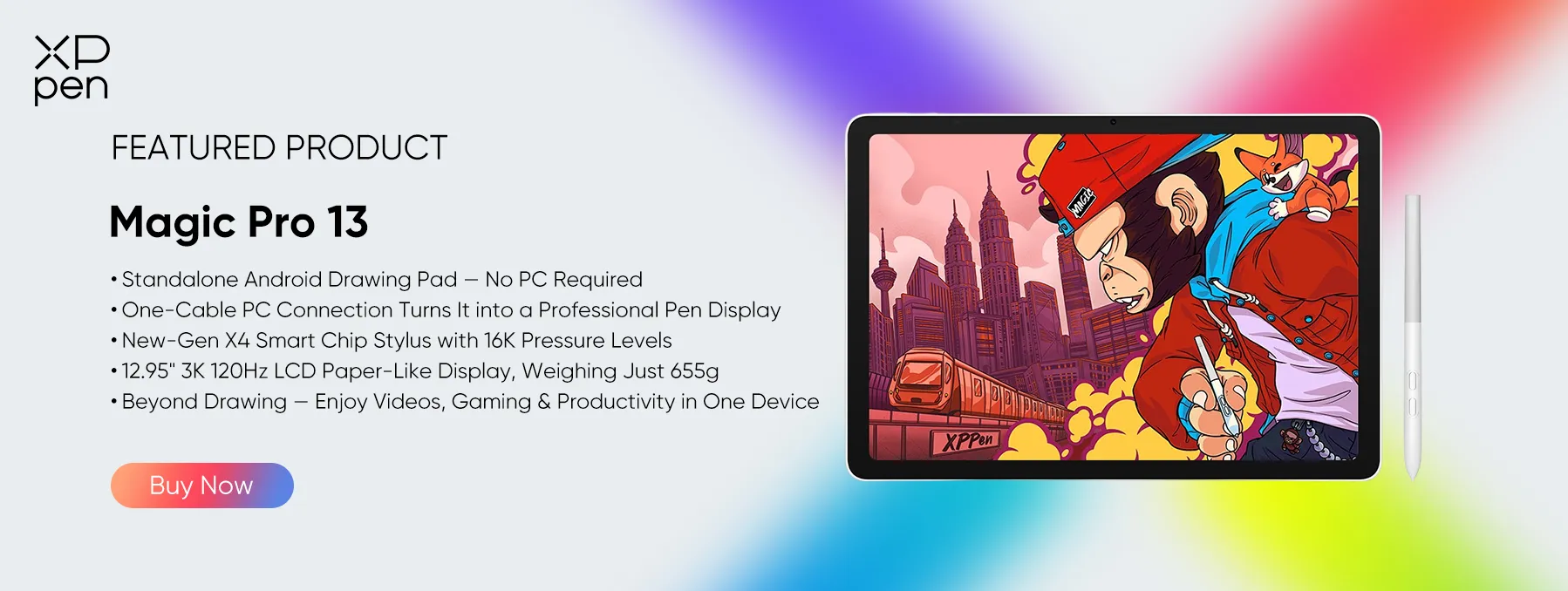
The XPPen Magic Pro 13 is worth considering for students majoring in illustration, graphic design, animation, or digital art. It combines standalone Android 16 functionality with a PC-connected drawing display mode, making it suitable for both mobile sketching and desktop creative workflows.

Part 2. 4 Best iPads for College Students
1. iPad Air — Best All-Around Choice for College
The iPad Air with the M4 chip is a strong all-around option for college students who need a tablet for coursework, research, note-taking, and creative projects. It comes in 11-inch and 13-inch sizes, so students can choose between a more portable device and a larger workspace for reading PDFs, viewing lecture slides, or working with multiple apps.
Its Liquid Retina display supports Apple Pencil Pro and Apple Pencil (USB-C), making handwritten notes, diagrams, and document annotations easier. The M4 chip also provides the processing capability for demanding apps, photo editing, and multitasking.
With storage options ranging from 128GB to 1TB, students can select a configuration that fits their coursework and file-storage needs. A compatible keyboard can also make longer assignments and research tasks more comfortable.
Key Specifications
-
Chip: Apple M4 with an 8-core CPU, 9-core GPU, and 16-core Neural Engine
-
Display: 11-inch or 13-inch Liquid Retina display; up to 2732 × 2048 resolution on the 13-inch model
-
Storage: 128GB, 256GB, 512GB, or 1TB
-
Apple Pencil support: Apple Pencil Pro and Apple Pencil (USB-C)
-
Battery life: Up to 10 hours of web browsing over Wi-Fi or video playback
For most students, the iPad Air offers a practical balance of performance, portability, and accessory support. The 11-inch model is easier to carry between classes, while the 13-inch version gives students more room for notes and split-screen work. It is especially suitable for students who want one tablet for both academic tasks and creative activities.
2. iPad — Best Budget Option for Students
The 11-inch iPad with the A16 chip is a practical choice for students who want an iPad for everyday academic tasks without stepping up to the Air or Pro range. Its display provides enough space for reading digital textbooks, reviewing lecture slides, browsing research sources, and completing online coursework.
The A16 chip supports common student activities, including note-taking, video calls, document editing, and switching between everyday apps. Students can use the compatible Apple Pencil (USB-C) for handwritten notes, sketches, and PDF annotations; the first-generation Apple Pencil is also supported with a USB-C to Apple Pencil Adapter for pairing and charging.
Storage options start at 128GB, with larger capacities available for downloaded course materials and documents. Paired with a compatible keyboard, this iPad can also handle essays, emails, and other writing tasks.
Key Specifications
-
Chip: Apple A16 with a 5-core CPU, 4-core GPU, and 16-core Neural Engine
-
Display: 11-inch Liquid Retina display with 2360 × 1640 resolution at 264 ppi
-
Storage: 128GB, 256GB, or 512GB
-
Apple Pencil support: Apple Pencil (USB-C) and Apple Pencil (1st generation, with adapter)
-
Battery life: Up to 10 hours of web browsing over Wi-Fi or video playback
This iPad is best for students whose main priorities are reading, research, digital notes, and assignments rather than intensive creative workloads. Its 11-inch display provides a useful workspace while remaining portable enough for daily campus use. Check accessory compatibility before buying a stylus or keyboard, as accessories may be sold separately.
3. iPad mini — Best Compact iPad for College
The iPad mini with the A17 Pro chip suits students who value portability and want a smaller device they can carry around campus throughout the day. Its 8.3-inch display is more compact than the screens on the standard iPad and iPad Air, making it convenient for reading course materials, checking schedules, reviewing flashcards, and taking quick notes between classes.
Despite its small size, the display offers a sharp 326-pixel-per-inch resolution, P3 wide color, True Tone, and an anti-reflective coating. It supports both Apple Pencil Pro and Apple Pencil (USB-C), so students can annotate PDFs, write short notes, and sketch diagrams. The A17 Pro chip also supports everyday productivity and compatible creative apps.
With 128GB, 256GB, and 512GB storage options, students can choose the capacity that suits their study files and offline content.
Key Specifications
-
Chip: Apple A17 Pro with a 6-core CPU, 5-core GPU, and 16-core Neural Engine
-
Display: 3-inch Liquid Retina display with 2266 × 1488 resolution at 326 ppi
-
Storage: 128GB, 256GB, or 512GB
-
Apple Pencil support: Apple Pencil Pro and Apple Pencil (USB-C)
-
Weight: 293g for the Wi-Fi model or 297g for the Wi-Fi + Cellular model
The iPad mini is a good fit for students who read frequently, move between classrooms, or prefer a compact digital notebook. Its smaller screen is less convenient for long essays and viewing two documents side by side than a larger iPad. Students who regularly work with detailed spreadsheets or extensive lecture slides may prefer the iPad Air instead.
4. iPad Pro — Best for High-End Creative Work
The iPad Pro with the M5 chip is designed for students who need advanced performance and a premium display for demanding academic or creative work.
Available in 11-inch and 13-inch sizes, it features an Ultra Retina XDR display with Tandem OLED technology, delivering high contrast, rich color, and support for ProMotion refresh rates up to 120Hz. These features are useful for students working with digital illustration, video editing, animation, photography, and other visually demanding projects.
The M5 chip provides substantial processing capability for compatible professional apps, while storage configurations extend up to 2TB for larger project files. Apple Pencil Pro and Apple Pencil (USB-C) support make drawing and precise annotation possible, and the Thunderbolt/USB 4 port supports fast data transfer and compatible external displays. For students who genuinely need these capabilities, the Pro can serve as a versatile creative workstation.
Key Specifications
-
Chip: Apple M5; CPU and memory configurations vary by storage capacity
-
Display: 11-inch or 13-inch Ultra Retina XDR Tandem OLED display with ProMotion up to 120Hz
-
Storage: 256GB, 512GB, 1TB, or 2TB
-
Apple Pencil support: Apple Pencil Pro and Apple Pencil (USB-C)
-
Port: Thunderbolt / USB 4 with support for data transfer up to 40Gb/s
The iPad Pro is most appropriate for students whose courses involve professional creative applications, complex visual projects, or intensive multitasking. Students should compare the additional capabilities with their actual coursework and budget before choosing it over the iPad Air.
Part 3. Best iPad Alternative for College: XPPen Magic Pro 13
Looking for an iPad alternative for college that supports both everyday mobile use and professional digital art? The XPPen Magic Pro 13 Standalone Drawing Pad is worth considering for students majoring in illustration, graphic design, animation, or digital media. Unlike a traditional tablet designed primarily for general-purpose use, it combines a standalone Android experience with a dedicated PC drawing display mode.

Why Choose the XPPen Magic Pro 13?
1. One Device for Mobile and Desktop Creation
Running Android 16, the Magic Pro 13 lets students sketch, take visual notes, and work on creative projects without a computer. When more advanced desktop tools are needed, its hardware-level Drawing Display Mode connects to a compatible PC through a single USB-C cable, making it easier to move from classroom sketches to detailed project work.
2. A Display Designed for Creative Coursework
The 12.95-inch 3K display (3096 × 2064) features a 120Hz refresh rate and a paper-like AG+AF nano-etched surface. Paired with the X4 Smart Chip Stylus, which supports 16,384 pressure levels, 2g initial activation force, and 60° tilt, it offers precise control for illustration, digital painting, and design assignments.
3. Portable for Campus Life
At just 655g and 6.65mm thin, the Magic Pro 13 is easy to carry between classes, studios, and study spaces. Its 10,200mAh battery also supports creative work on the go, while the built-in Shelf app helps students organize visual references and inspiration.
Who Is It Best For?
The XPPen Magic Pro 13 is best for art students, graphic design majors, illustration and animation students, and digital content creators who want a portable drawing tablet with both standalone functionality and PC connectivity.
If your college coursework centers on digital art and you want the flexibility to create independently and continue working with desktop software, the Magic Pro 13 offers a compelling iPad alternative for college students .
Part 4. FAQs About the Best iPad for College
1. Which iPad is best for most college students?
The iPad Air is a strong all-around choice for students who need note-taking, research, multitasking, and creative capabilities. The standard iPad is a more budget-friendly option for everyday coursework, while the iPad mini suits students who prioritize portability.
2. Is the iPad Air better than the iPad Pro for college?
The iPad Air offers a useful balance of performance and cost for most students. The iPad Pro is better suited to students who need its advanced display, 120Hz ProMotion, and additional performance for demanding creative applications.
3. Is the iPad mini too small for taking college notes?
Not necessarily. The iPad mini works well for quick notes, reading, flashcards, and portable study sessions. Its 8.3-inch display can feel restrictive when annotating full-page PDFs, viewing detailed diagrams, or working with multiple apps.
4. How much storage should a college iPad have?
A 128GB model may be enough for notes, PDFs, apps, and cloud-based documents. Students who store large videos, creative projects, or extensive offline course materials should consider 256GB or more.
5. Can an iPad replace a laptop for college?
An iPad can handle many academic tasks, including reading, note-taking, document editing, presentations, and video calls. It may not replace a laptop for specialized desktop software, advanced coding, or certain engineering and design workflows. Check your course requirements before relying on it as your only computer.
6. Is the XPPen Magic Pro 13 a good alternative to an iPad?
It can be a good alternative for art and design students who want standalone Android functionality and the option to connect to a compatible PC for drawing. It is not a direct replacement for iPadOS, so students should check software and course requirements before deciding.
Conclusion
The iPad Air offers a balanced option for general coursework, note-taking, research, and moderate creative work. The standard iPad suits students who want an iPad for everyday assignments and already have a laptop. The iPad mini prioritizes portability, while the iPad Pro fits students who need high-end performance for demanding creative tasks.
Students focused on illustration, graphic design, animation, or digital content creation can also consider the XPPen Magic Pro 13 Standalone Drawing Pad as an iPad alternative. Its combination of standalone Android functionality and PC-connected drawing capabilities may suit creative workflows that rely on desktop software.
About Us
Founded in 2005, XPPen is a leading global brand in digital art innovation under Hanvon UGEE. XPPen focuses on the needs of consumers by integrating digital art products, content, and services, specifically targeting Gen-Z digital artists. XPPen currently operates in 163 countries and regions worldwide, boasting a fan base of over 1.5 million and serving more than ten million digital art creators.
Learn moreRecommended Articles
ROUNDUPS iPad vs Samsung Tablet 2026: Which One Fits Your Needs? ROUNDUPS iPad vs Drawing Tablet: Is It Necessary to Get Both? FOCUSED XPPen Magic Drawing Pad vs iPad Pro: I Tested Both






Ready to invest in the right tools?
Get expert buying advice, unbiased reviews, and exclusive deals on drawing tablets, and accessories.
