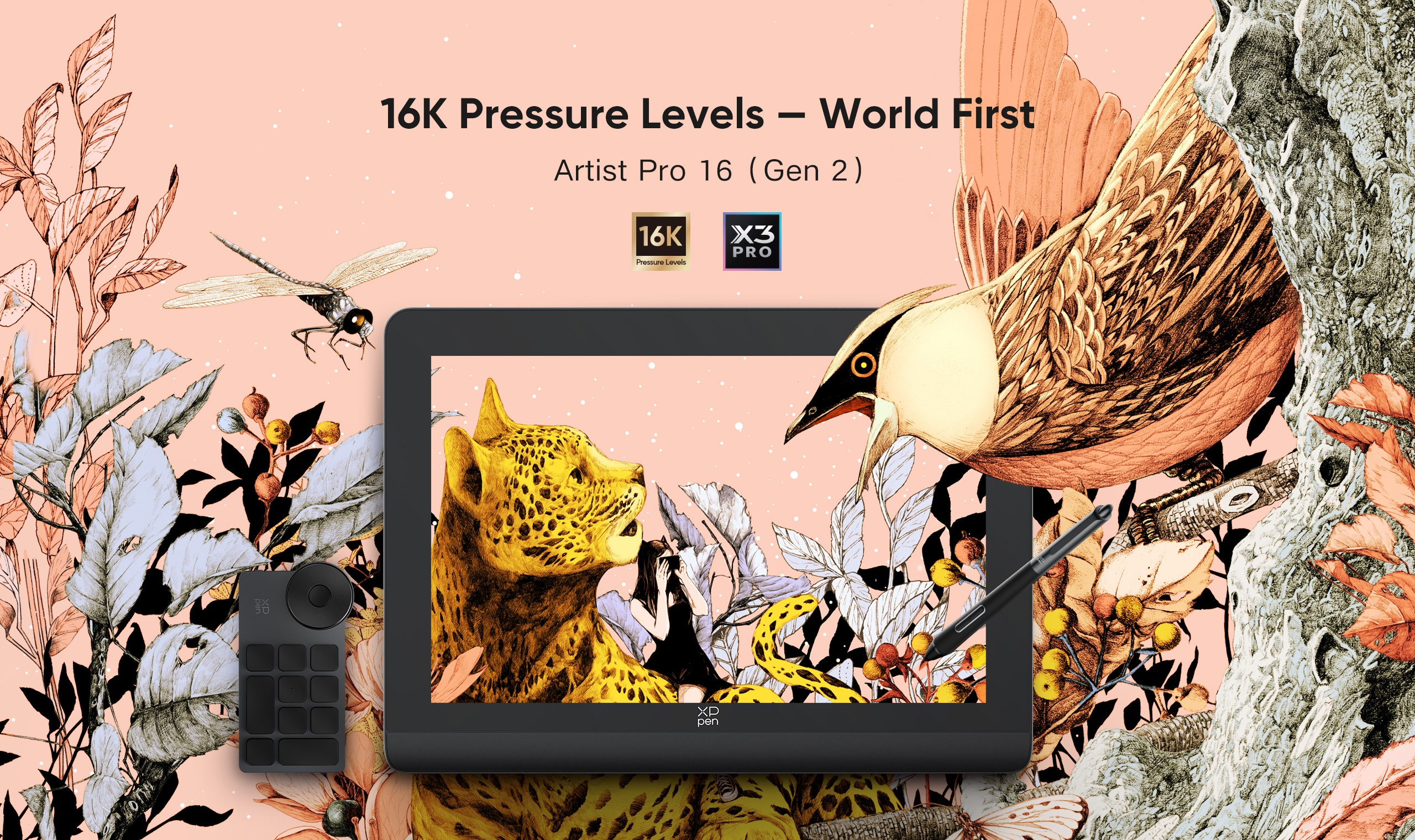
XPPen Artist Pro 16 (Gen 2) Review: 16K Drawing Tablet for Beginners & Pros
FOCUSEDThe XPPen Artist Pro 16 (Gen 2) sets a new benchmark in digital drawing with its industry-first 16K pressure sensitivity. It delivers a smooth, responsive experience for sketching, illustrating, and editing. With advanced stylus technology and a color-accurate display, this pen display is designed to enhance workflow and creativity. In this XPPen Artist Pro 16 (Gen 2) review, we take a closer look at its features and the technology behind its performance.

What is XPPen Artist Pro 16 (Gen 2)?
The XPPen Artist Pro 16 (Gen 2) is a professional-grade pen display built for digital artists, designers, and creatives. It features the innovative X3 Pro Smart Chip Stylus with 16,384 pressure levels . It offers unmatched control and sensitivity. Combined with a fully laminated 16-inch display and wide color gamut support, it delivers a natural drawing experience that closely mimics traditional media.
Who Is XPPen Artist Pro 16(Gen 2) For?

The XPPen Artist Pro 16 (Gen 2) is built to solve real challenges that different types of users face when working digitally.
Professional Illustrators
For illustration, accuracy and control are critical. Many tablets struggle with jittery lines or inconsistent pressure response, especially when working on fine details. This device improves that by offering smoother line transitions and more predictable pen behavior. So the professional illustrators can easily achieve clean and polished results.
Graphic Designers
For graphic designers, color accuracy is often a major concern. Poor displays can lead to mismatched colors between the screen and the final output. This pen display helps minimize that issue with reliable color reproduction. So it’s easy to work on branding, web design, and print-ready visuals without constant corrections.
Digital Painters and Animators
Workflow interruptions can slow down creativity. Lag, poor sensitivity, or uncomfortable surfaces can break concentration. This tablet provides a fluid drawing experience that supports long sessions, detailed shading, and consistent brush control.
Beginners
One of the biggest issues is investing in a device that becomes limiting too quickly for beginners. Entry-level tablets often lack advanced features, and users need to upgrade sooner than expected. This model offers room to grow. So, the beginners develop their skills without needing an immediate replacement.
Content Creators and Editors
Many content creators struggle with precision input when working on thumbnails, retouching, or video overlays. XPPen Artist Pro 16 solves this. Using a pen instead of a mouse gives better control, especially for detailed adjustments.
Overall, this pen display is ideal for anyone who wants a more natural, accurate, and reliable way to create digitally, whether you're just starting out or working at a professional level.
XPPen Artist Pro 16 (Gen 2) Product Specifications
| Feature | Details |
|---|---|
| Display Size | 16-inch |
| Weight | Approx. 1.5 kg (estimated) |
| Resolution | 2560 × 1600 (WQXGA) |
| Stylus | X3 Pro Smart Chip Stylus |
| Pressure Levels | 16,384 |
| Tilt Support | 60° |
| Dimensions | 405.11 × 291.37 × 20.23 mm |
| Work Area | 344.68 × 215.42 mm |
| Color Gamut | 99% sRGB, 97% Adobe RGB, 99% DCI-P3 |
| Brightness | 250 cd/m² |
| Response Time | 20 ms |
| Connectivity | USB-C, 3-in-1 cable |
| Compatibility | Windows, macOS, Android, ChromeOS, Linux |
| Regular Price | $599.99 |
| Sale Price | $499.99 |
Note: Specific prices vary by region and promotions; please check the page for accurate information.
What Defines XPPen Artist Pro 16 (Gen 2)
Not every drawing display delivers a truly natural creative experience. Several key factors play a role in achieving precise pen response with a visually consistent screen:
Display
XPPen Artist Pro 16 (Gen 2) offers a 2560 × 1600 resolution, which delivers sharp visuals and enough detail for professional work. The 16:10 aspect ratio provides more vertical space than standard displays, which is particularly useful when working on complex compositions or timelines.
A fully laminated screen eliminates parallax. So the cursor aligns precisely with the pen tip. This improves accuracy and reduces the need for constant corrections.
The anti-glare etched glass surface minimizes reflections and adds a subtle texture that feels closer to paper. This makes drawing more comfortable, especially during long sessions or in bright environments. Additionally, the low-blue-light certification helps reduce eye strain during extended use.
Stylus
The X3 Pro Smart Chip Stylus is the defining feature of this device. With 16K pressure levels, it doubles the sensitivity found in most standard tablets. This delivers smoother transitions between thin and thick lines and better control over shading.
The stylus also offers:
- 3g initial activation force (IAF) for a natural feel.
- 60° tilt support for realistic brush strokes.
- Improved accuracy (±0.4 mm) for detailed work.
- Minimal lag with faster response time.
In real-world use, the stylus feels responsive and fluid. You don’t need to press hard to achieve darker strokes, which reduces hand fatigue and extends the lifespan of the nib.
Color
Color performance is another standout aspect. The display covers:
- 99% sRGB
- 97% Adobe RGB
- 99% DCI-P3
This wide color coverage provides accurate and vibrant visuals. Suitable for professional tasks like photo editing, digital painting, and video production.
You can switch between different color spaces for workflows across web, print, and film. With a color accuracy rating of ΔE < 2.2, the colors appear true to life, reducing the need for constant adjustments.
Design
The tablet features a sleek metal body with a clean, minimal design. It feels sturdy without being overly bulky. Suitable for both desk setups and portable use.
Key design elements include:
- Built-in foldable stand for adjustable angles.
- X-Edge wrist rest for comfort during long sessions.
- Minimal bezels for better focus and grip.
- Dual USB-C ports for flexible connectivity.
The inclusion of the X-Remote Control is a notable change. Instead of built-in shortcut keys, the device uses a separate remote with customizable buttons and a dial.
Driver
Driver performance is often overlooked, but it plays a crucial role in usability. The Artist Pro 16 (Gen 2) offers a stable and user-friendly driver experience across multiple platforms, including Windows, macOS, Android, Chrome OS and Linux.
Setup is straightforward:
- Install the driver
- Connect the device via USB-C.
- Calibrate the pen
- Customize shortcut keys
Further reading: How to connect your Artist Pro 16 (Gen 2) to your computer?
With this driver, you can adjust pressure sensitivity, map display areas, and configure shortcuts. It also supports switching between color profiles, which is essential for professional workflows.
Most users report smooth performance; occasional recalibration may be needed depending on your setup.
Connectivity & Compatibility
The Artist Pro 16 (Gen 2) offers flexible connectivity options, including USB-C and a 3-in-1 cable setup. This makes it compatible with a wide range of devices, from modern laptops to older desktops.
The dual USB-C ports allow for a cleaner setup with fewer cables. It helps to maintain an organized workspace. It also supports multiple platforms, including Windows, macOS, Android, etc., giving users more flexibility in how they work.

X-Remote Control & Workflow Efficiency
Instead of built-in shortcut keys, this tablet uses a separate X-Remote Control. While this may feel unusual at first, it offers greater flexibility in positioning and customization.
The remote includes programmable buttons and a dial. You can quickly access commonly used functions like zooming, brush size adjustment, and undo commands. This can significantly speed up the workflow once properly configured.
Drawing Experience & Surface Feel
The drawing experience is enhanced by the textured screen surface, which provides slight resistance similar to paper. This improves control and makes strokes feel more natural.
Unlike glossy screens, the anti-fingerprint coating keeps the display clean and reduces distractions. Combined with the responsive stylus, the overall experience feels smooth and consistent.
FAQ
Is XPPen Artist Pro 16 (Gen 2) worth it?
Yes, the XPPen Artist Pro 16 (Gen 2) is widely considered worth it, especially for its price-to-performance ratio. It delivers high-end features like a 2.5K display and advanced stylus technology at a significantly lower cost than many competitors. Its biggest value lies in the 16K pressure sensitivity and smooth drawing experience, which makes it feel responsive and precise for both beginners and professionals.
Is the 16K pen actually better in real drawing?
In practice, the difference is noticeable in smoother transitions and finer control. While not everyone needs 16K levels, professionals and detail-focused artists will benefit from it.
Is the color accurate of XPPen Artist Pro 16 (Gen 2) enough for design work?
Yes, it has strong color accuracy with 99% sRGB and good Adobe RGB and DCI-P3 coverage. This makes it suitable for web, illustration, and most design tasks.
Is XPPen Artist Pro 16 (Gen 2) good for beginners?
Yes, the XPPen Artist Pro 16 (Gen 2) is a strong option for beginners who are serious about learning digital art. It offers a smooth drawing experience with high-pressure sensitivity and a fully laminated display, which helps new users develop better control and accuracy from the start.
How reliable is the driver on Windows and Mac?
The driver is generally stable and easy to use. It works smoothly on both Windows and macOS. It supports essential customization options like pressure sensitivity, shortcut keys, and display mapping.
Final Words
The XPPen Artist Pro 16 (Gen 2) combines innovation, performance, and affordability. Its 16K pressure sensitivity, color-accurate display, and thoughtful design make it a strong contender in the pen display market. If you want precision, comfort, and value, this tablet stands out as one of the best options available today.

About Us
Founded in 2005, XPPen is a leading global brand in digital art innovation under Hanvon UGEE. XPPen focuses on the needs of consumers by integrating digital art products, content, and services, specifically targeting Gen-Z digital artists. XPPen currently operates in 163 countries and regions worldwide, boasting a fan base of over 1.5 million and serving more than ten million digital art creators.
Learn moreRecommended Articles
FOCUSED Magic Drawing Pad: XPPen's First Standalone Drawing Tablet FOCUSED XPPen Artist 13.3 Pro V2 Review FOCUSED XPPen Artist 12 3rd Review: The Best Portable Drawing Tablet for Beginners FOCUSED XPPen Artist Pro 27 (Gen 2) Review: A 4K 120Hz Drawing Tablet with Smart Touch Control FOCUSED XPPen Artist Ultra 16 Review: 4K OLED Touch Pen Display





Ready to invest in the right tools?
Get expert buying advice, unbiased reviews, and exclusive deals on drawing tablets, and accessories.
